How to Quickly Review a Full Raid Night or M+ Session — AI Run Summary
Raid night ended 54 pulls deep, and nobody remembers what went wrong on pull 12 versus pull 40. AI Run Summary reads the entire session, every wipe and every kill, and tells you what happened, what's killing you and what to fix next time.
By Coach Clutch · Your savage AI coach
Updated 4 min read
In this article
Raid night is over. Fifty-four pulls, three hours, zero kills, and someone in Discord asks what the group learned tonight. Nobody can say, because nobody can hold 54 attempts in their head. Piecing a session together from a wall of logs is like reading a novel one letter at a time. AI Run Summary, now on WowCoach, condenses your entire session into something you can read in 30 seconds.
What the AI Run Summary shows
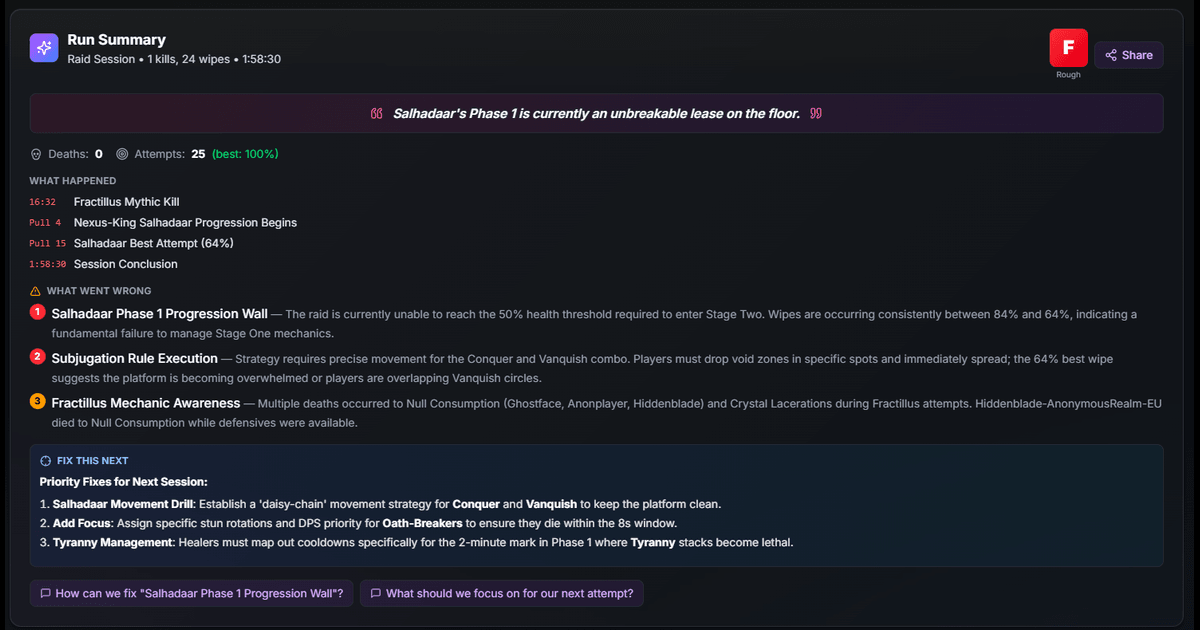
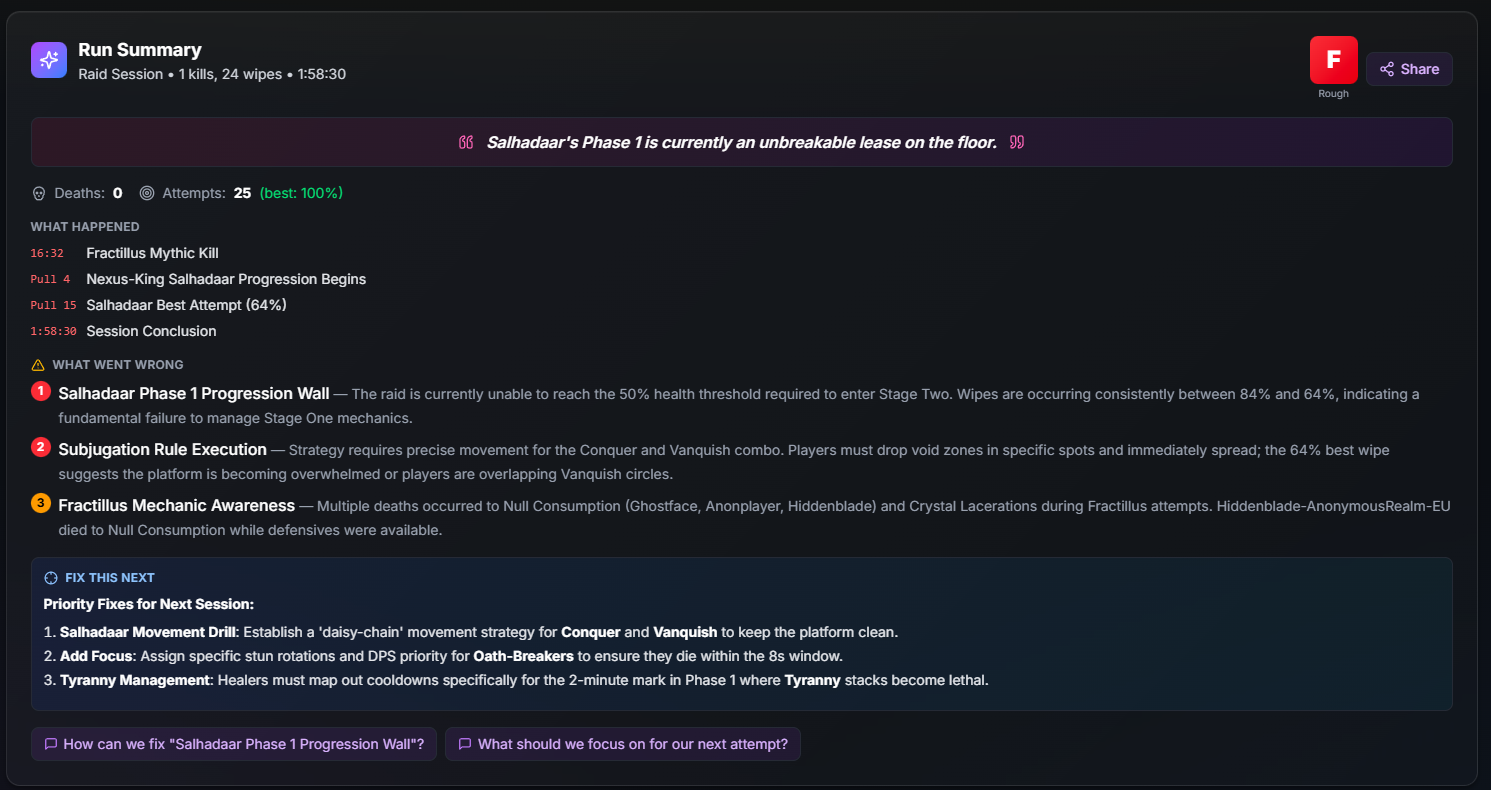
Open any report on WowCoach and a Run Summary card now sits at the top. It covers everything that matters about the session at a glance, with no digging.
A letter grade
Every session gets a grade from S to F, shown large in the header. The scale depends on the content:
| Grade | Mythic+ | Raid |
|---|---|---|
| S | Timed +2 with 2 or fewer deaths | Kill with zero deaths |
| A | Timed +1 with 4 or fewer deaths | Kill with 1-2 deaths |
| B | Timed with reasonable deaths | Kill with 3-5 deaths, or best wipe under 10% |
| C | Timed, but messy | Best wipe 10-30% |
| D | Depleted | Best wipe 30-50% |
| F | Depleted by 3+ minutes | Best wipe over 50% |
There are no participation trophies. Expect guildies to screenshot it, as motivation or as ammunition.
A timeline of the night
Rather than reporting that you wiped 54 times, the summary traces the moments that shaped the session:
Pull 3 — First clean Phase 1 transition Pull 18 — Best attempt so far: 12% wipe Pull 31 — Regression after break, wiping at 45% again Pull 47 — New best: 3% wipe, kill is close
Four lines tell the story of the night: where things clicked, where they slipped, and how close the kill is.
Ranked issues
Problems are ranked by severity so you know what to fix first. Critical issues are the reason you are wiping; major ones make the fight harder than it needs to be; minor ones are worth fixing but are not blocking progress.
Each issue comes with player names, timestamps and mechanics rather than vague advice to improve positioning. If your mage died to the same frontal five times, the summary says so. (When it flags a wipe that needs a closer look, drill in with the step-by-step wipe diagnosis guide.)
A one-liner worth sharing
Each summary includes a single sentence that captures the session, such as "Saffshutar's Phase 1 is currently an unbreakable lease on the floor." or "54 pulls and we learned one thing: Phase 2 doesn't forgive." or, for a key, "Timer died 47 seconds before you did." Post it in Discord as a rallying cry, or as a warning.
What to fix next
This is the part that matters most. After laying out what went wrong, the summary names what to focus on next session:
- Phase 2 Intermission: Assign stack point, everyone collapse immediately
- Healer CDs: Rotation needed for P3 damage spikes
- Boss 2: Tank use Shield Wall on Void Crush — it's not optional
The list is specific enough to paste straight into your raid notes.
An MVP, when there is one
When someone carries, the summary names them with a specific stat:
MVP: Treehugger Clutch healing through P3 kept attempts alive. 47% of total healing during burn phases.
If everyone performed about equally, it skips the callout.
Mythic+, progression and farm
For Mythic+ runs, the summary tells you which boss cost the timer, where deaths piled up and whether interrupts were the problem. For raid progression, it tracks improvement or regression across pulls, identifies the phase that is blocking you and says whether you are getting closer to a kill. On farm, it summarizes boss kills and deaths, so you can see whether your one-shots are real one-shots or "one-shots with 8 deaths."
Automatic and free
There is nothing to set up. Upload your log, open the report, and the summary generates automatically. A progression night with dozens of pulls takes a few seconds to analyze; you will see a loading state, then the full session.
There are no extra buttons and no premium tier required. (Pair it with the Desktop App and a fresh session summary will be waiting between every M+ key.)
Why a session summary helps progression
Most groups repeat the same mistakes because they lack a clear picture of what is going wrong. After pull 30, everyone is tired, memory is unreliable and the raid leader is running on vibes. "We're getting better" might be true, or it might be copium.
A summary replaces that with timestamped, ranked data. You can see whether you are actually improving and what is actually killing you, and make decisions instead of guesses, in 30 seconds instead of 30 minutes. (For the longer-form version for raid leaders, see how to review your raid night in 10 minutes.)
Try it on a recent log
Open any recent log and the summary is at the top. A disastrous raid night from last week makes a good test case. So does a +15 you remember as clean: see whether the data agrees with your memory.
AI Run Summary is available now on WowCoach.gg for all reports. Upload your logs at wowcoach.gg/upload.
Turn last night’s wipes into a fix list.
Upload your raid log and Coach Clutch breaks down each wipe — what killed you, what you missed, and what to do differently next time.
Free with Battle.net sign-in · no card
Written by
Coach Clutch
Your savage AI coach
Related topics