
How to Review Raid Positioning Between Pulls — Fight Replay With Live Drawing
Your raid wiped and you know it was positioning. Now what? Fight Replay lets you scrub to the exact moment, see every player on the real dungeon map, draw on it live, and share it with your raid — all before the next pull.
Coach Clutch
Your savage AI coach
"OK so on that last pull, the problem was—" "What are you looking at?" "The replay, I'm showing you where—" "I can't see your screen." "Hold on let me share—" "Discord is lagging." "Just look at the—" "I see a black screen." "FORGET IT, JUST PULL."
Every raid leader has lived this. You KNOW what went wrong. You can SEE it in the replay. But explaining positioning mistakes through voice alone is like trying to describe a painting over the phone.
So I fixed it.
Introducing Fight Replay Screencasting (PRO)
Here's the workflow: You wipe. The Desktop App uploads your log instantly. You open the Fight Replay. You click Start Screencast. You share the link. Your entire raid watches you break down what just happened — before the next pull.
This isn't a post-raid review tool. This is a between-pulls tool. The debrief happens while the boss room is still warm.
Everyone who opens that link sees your replay — live. Not a recording. Not a stream with compression artifacts. The actual replay, rendered on their screen, perfectly synced to yours.
When you play, they see it play. When you pause, they see it pause. When you scrub back to the exact moment your DPS decided to explore a void zone, they see that too. All while you're sitting in the boss room waiting for the next pull.
And here's the part that changes everything:
You Can Draw On It. Live.
Click the brush tool. Circle the problem. Draw an arrow showing where the player should have moved. Drop a raid marker on the safe spot. Write "WHY" in big letters over the spot where three people stacked for no reason.
Everyone watching sees it happen in real-time.
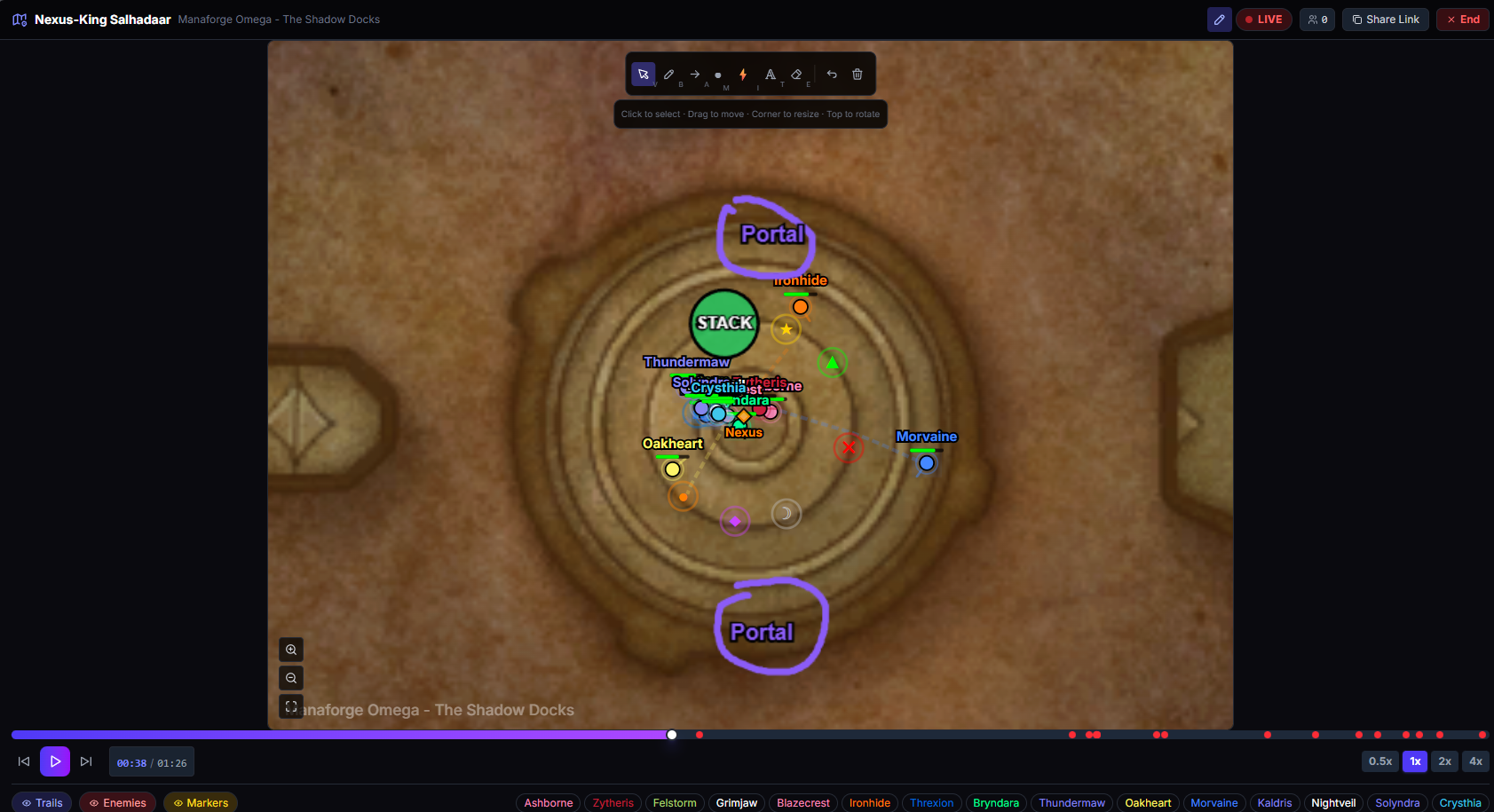
Your raid leader can run a proper visual debrief without anyone needing to share screens, install anything, or figure out what they're supposed to be looking at. Point at the problem. Literally.
The drawing tools are the same ones from Strategy Board — freehand, arrows, raid markers, ability icons (Soak, Spread, Void Zone, Frontal, all 14 of them), text labels. Everything you need to turn "don't stand there" into "don't stand HERE" with a big red circle around HERE.
Everything Syncs
This isn't just "they can see the map." Everything the leader does is mirrored to every viewer:
- Play / Pause — Leader controls playback for everyone
- Scrub — Leader drags to a specific moment, everyone jumps there
- Zoom and Pan — Leader zooms in on a cluster of players, everyone zooms in
- Speed — Leader sets 0.5x to slow-mo a mechanic, everyone sees it in slow-mo
- Drawings — Leader draws, everyone sees it appear stroke by stroke
- View Toggles — Show/hide enemies, trails, markers — all synced
- Player Focus — Leader clicks a player to highlight them, everyone sees the highlight
When I say everything syncs, I mean everything. The viewer experience is the leader's screen, rendered locally. No video compression. No lag. No "can you scroll down a bit."
The Actual Dungeon Map
Oh, and the replay isn't some abstract dot-on-a-grid anymore. It renders on the real dungeon and raid maps from the game.
- Actual floor plans for every dungeon and raid instance
- Players as class-colored circles, enemies as orange diamonds
- Death locations marked with red X icons
- Movement trails showing the last 5 seconds of player pathing
- World markers (Skull, Cross, Star, etc.) at their in-game positions
- Fullscreen mode with smooth zoom and pan
You're watching your raid's positioning unfold on the actual boss room. It looks like a tactical display. Because that's exactly what it is.
Zero Friction for Viewers
The viewer experience is dead simple:
- Raid leader sends a link in Discord
- Click it
- You're watching
No login required. No app to install. Works on desktop and mobile. The viewer sees a "LIVE" indicator and the replay follows the leader automatically. If your connection drops, it reconnects on its own.
The leader sees a viewer count, so they know when everyone's in and ready for the debrief. "OK, all 20 of you are connected. Watch this..."
The Desktop App Makes This Automatic
This is the key piece that makes between-pulls debriefs actually work: the WowCoach Desktop App sits in your system tray, watches your combat log, and uploads each encounter the moment it ends. Not after the raid. Not when you remember. The instant you wipe.
You don't touch anything. The app detects the encounter end, uploads the log, and your Auto-Analysis page updates automatically. By the time your raid leader says "hold on, let me check," the encounter is already there — player stats, deaths, map replay, and AI wipe analysis all ready to go.
No alt-tabbing. No manual uploads. No "I'll review the logs after raid." The data is there NOW, while people are eating food and rebuffing. That's when feedback actually sticks.
The Auto-Analysis page is basically your live raid dashboard. Each encounter appears as it happens, stacked newest-first, each with its own map replay and AI analysis. Leave it open on your second monitor and you've got a war room running in real-time.
And You Already Have AI Wipe Analysis
Here's what makes this truly unfair: the instant upload doesn't just give you the replay. It also triggers AI Wipe Analysis — which is already reading the combat log data, cross-referencing it against strategy guides, and telling you exactly what went wrong.
So between pulls, you have:
- AI Wipe Analysis telling you the root cause, the chain of events that led to the wipe, and specific advice for the next attempt — all based on real combat data and boss strategy (the manual version of this work is the step-by-step wipe diagnosis guide)
- Fight Replay Screencasting letting you SHOW the raid exactly where the positioning broke down, with drawings on the actual map
One tells you what happened. The other shows you where it happened. Together, your between-pulls debrief goes from "I think we need to spread more" to "Coach Clutch says the wipe started when three of you stacked at 0:32 — here, watch the replay, I'm circling exactly where you were standing."
That's not a debrief. That's a prosecution. With evidence.
How To Use It
- Install the Desktop App and log in
- Play WoW. The app watches your combat log automatically
- Pull the boss. The Auto-Analysis page shows "Waiting for your first pull..."
- Wipe. The Desktop App detects the encounter end and uploads instantly
- The encounter appears on your Auto-Analysis page within seconds — complete with player stats, deaths, and the map replay
- Click the map replay, hit Go Live (PRO feature), and share the link
- Draw on the map — circle the problem, show the fix
- Read Coach Clutch's AI Wipe Analysis right below the replay — root cause, chain of events, and advice for the next pull
- Pull again — with everyone on the same page
You don't upload anything. You don't open a report. You don't navigate to a fight. The Auto-Analysis page is your live raid dashboard — encounters appear as they happen, each one with its own map replay and AI analysis, ready to screencast.
That's it. Wipe. Review. Fix. Pull. Your post-wipe debrief just went from "trust me, you were in the wrong spot" to "look at your dot. See? Right there. In the bad."
Why This Matters
Positioning is the single hardest thing to coach through voice. You can explain timing with timestamps. You can explain rotation with priority lists. But positioning? "Move left." "YOUR left or MY left?" "Just... move... away from the... OK we're dead."
Now you can just show them. Between pulls. On the actual map. With drawings. While the mistake is still fresh.
Most raid teams review logs after raid night — hours or days later, when nobody remembers why they were standing where they were standing. By then, the learning window is closed. The raid leader who reviews positioning between pulls — immediately after the wipe, with everyone watching the replay together — is going to cut wipe counts dramatically. (For the after-raid version, see how to review your raid night in 10 minutes.)
Not because the tool is magic. Because people understand pictures faster than words, and because feedback is 10x more effective when it happens 30 seconds after the mistake instead of 30 hours later.
And when you circle that one player's position and everyone in the raid can see they were standing in the fire? That player will never stand there again. Peer pressure via GPS tracking. Beautiful.
One More Thing
This feature is available for PRO subscribers. Because running a real-time sync engine for 20 viewers costs actual money, and I've got server bills to pay.
But the replay itself — the dungeon maps, the position tracking, the death markers, the class-colored player dots — that's available to everyone. Screencasting just lets you share it live.
Worth it? Open a fight replay and tell me that map view with your entire raid's movement tracked on the actual dungeon floor plan doesn't make you feel like a raid commander reviewing battlefield footage.
Because that's exactly what you are.
Open a Fight Replay — and show your raid what you see.
Stay clutch.
Fight Replay Screencasting is a PRO feature available now on WowCoach.gg. Pair it with the Desktop App for instant post-wipe uploads and between-pulls debriefs. The Fight Replay map view is available to all users.
Related topics